Best Alarm Clocks for Seniors That Are Easy to Use and Read
You want clear digits and simple controls-look for clocks with 2-inch or larger LED displays, like the Peakeep or DreamSky models, which offer high-contrast red or green numbers for easy viewing. Adjustable brightness helps reduce nighttime glare, while battery backup keeps time during outages. Models with loud alarms, USB charging, and large buttons enhance usability. Some include extra features like voice announcements or photo displays. Choosing the right one depends on your needs, and there’s more to explore about which features fit your routine best.
We are supported by our audience. When you purchase through links on our site, we may earn an affiliate commission, at no extra cost for you. Learn more. Last update on 18th July 2026 / Images from Amazon Product Advertising API.
Notable Insights
- Large, high-contrast displays with digits at least 2 inches tall enhance readability for seniors.
- Adjustable brightness settings reduce glare and support better sleep by minimizing nighttime light exposure.
- Battery backup retains time and alarm settings during power outages for reliable performance.
- Loud alarms with volume options and gradual sound increases ensure effective, customizable wake-ups.
- Simple interfaces with easy-to-read labels and minimal buttons improve usability for seniors.
Peakeep Digital Alarm Clock with USB Charger

If you’re a senior who values clear visibility and reliable function, the Peakeep Digital Alarm Clock with USB Charger offers straightforward design with practical benefits. Its 2-inch tall LED digits are easy to read from across the room, and five brightness levels let me adjust the display for day or night use-I can even turn it off completely to reduce light disturbance. The alarm starts at a medium volume but reaches 103 dB if I need it louder, and the 9-minute snooze works with just a tap. I appreciate that the USB port keeps my phone charged, and the battery backup keeps time during outages, though the display stays off to save power. It’s lightweight, fits neatly on my nightstand, and the included warranty gives me peace of mind.
Best For: Seniors and light sleepers who need a highly visible display, adjustable alarm volume, and reliable timekeeping with battery backup during outages.
Pros:
- Large 2-inch LED digits with five brightness levels for excellent visibility in any lighting condition
- USB charging port and battery backup ensure device charging and time retention during power outages
- Adjustable alarm volume up to 103 dB with convenient 9-minute snooze and one-touch shutdown
Cons:
- Display turns off during battery operation, limiting visibility in a power outage
- AAA batteries not included, required for backup functionality
- Maximum alarm volume must be manually set, not enabled by default
Amazon Basics Digital Alarm Clock with LED Display

The Amazon Basics Digital Alarm Clock with LED Display stands out as a solid choice for seniors who value simplicity, visibility, and reliability in their morning routine. I appreciate its bright green LED numbers-they’re easy to read from a distance, even at night. The oval design saves space on my nightstand, and the plastic build feels light but sturdy. It runs on AC power, with a 9V battery backup that keeps time during outages, which I find reassuring. The built-in nightlight is dim but helpful, and the snooze button works just as expected. With a 6-month warranty and thousands of solid reviews, it’s a dependable pick for consistent wake-ups.
Best For: Seniors and anyone seeking a simple, reliable digital alarm clock with clear visibility and basic helpful features like a nightlight and battery backup.
Pros:
- Bright green LED display is easy to read from a distance, even in the dark
- Compact oval design fits neatly on nightstands without taking up much space
- Battery backup preserves time and alarm settings during power outages
Cons:
- Nightlight is dim and offers limited illumination
- 9V battery not included, required for backup functionality
- Limited warranty period of only 6 months
Soobest Dementia Digital Clock for Seniors

For seniors managing memory challenges or vision changes, this digital clock stands out as a thoughtful tool designed with daily clarity in mind. I rely on its 7-inch HD screen to show time, date, and day clearly, even from across the room. It offers four display modes, including analog-style and high-contrast colors, plus labels for morning, afternoon, and night to reduce confusion. I use two of its 20 alarms for medication, adjusting the volume and choosing gentle sounds like birds or waves. It remembers all settings during outages, thanks to a backup battery, and mounts easily on a wall or shelf.
Best For: Seniors, elderly individuals, and those with dementia, Alzheimer’s, or vision impairments who need a clear, easy-to-read clock with reminder features to support daily routines.
Pros:
- Large 7-inch HD display with multiple modes and auto-brightness for excellent visibility and reduced confusion
- 20 programmable alarms with customizable sounds and volume ideal for medication and activity reminders
- Retains all settings during power outages thanks to built-in backup battery
Cons:
- Requires constant power via corded adapter, limiting portability
- No mention of voice output, which could aid users with severe vision impairments
- Plastic build may feel less durable despite lightweight design
Large Display Digital Clock for Seniors

Picking a clock with an extra-large, easy-to-read screen makes mornings less stressful, especially when fading vision gets in the way. I rely on the 7-inch HD display to show time, date, and day clearly, with large fonts and bright Sun/Moon icons. It offers 12 customizable themes and color options, helping me adjust for my needs, whether I’m color-blind or just prefer higher contrast. Twenty alarms and reminders keep me on track for meds or meetings, while 10 brightness levels let me reduce glare at night. The clock uses AC power with battery backup, stays accurate after outages, and offers gentle wake-up cues with adjustable volume and ringtones.
Best For: Seniors, individuals with vision impairments, or anyone needing a highly readable, feature-rich digital clock with customizable display and reminder functions.
Pros:
- 7-inch HD display with large, easy-to-read fonts and customizable themes ideal for seniors and those with visual challenges
- Supports 20 alarms and 20 reminders with clear text and icons, helping maintain daily routines
- Includes battery backup and automatic time reset after power loss, ensuring consistent accuracy
Cons:
- AA batteries not included, which are required for power outage backup functionality
- SD card and USB drive not included, limiting out-of-box use of photo playback feature
- Limited language support with only 6 options, which may exclude some non-English speakers
Westclox Classic Baby Ben Alarm Clock

Something about the gentle beep of the Westclox Classic Baby Ben makes mornings feel less like an interruption and more like a gradual return to the day-ideal for seniors who value a calm start without the shock of a jarring ring. I appreciate its vintage 1964 design, made in the USA, with a durable metal bezel and luminous hands that help me read time in dim light. It runs on one AAA battery, so I can place it anywhere-no cords needed. The molded plastic case fits both classic and modern rooms, and its reliable beep wakes me without stress. While it lacks a snooze feature, its simplicity supports steady routines, making it a solid, low-maintenance choice for light sleepers or those minimizing electronic disruption.
Best For: Seniors and light sleepers seeking a simple, vintage-styled alarm clock with a gentle wake-up call and reliable battery-powered operation.
Pros:
- Features a gentle beep alarm ideal for a calm, non-jarring start to the day
- Durable metal bezel and luminous hands enhance longevity and visibility in low light
- Portable, cordless design with AAA battery operation allows flexible placement anywhere
Cons:
- Lacks a snooze function, which may not suit those needing extra sleep time
- Beep alarm may be too soft for heavy sleepers
- Battery not included, requiring an additional purchase for immediate use
Sharp Digital Alarm Clock with Red LED

I appreciate how the Sharp Digital Alarm Clock with Red LED delivers clear, dependable performance for seniors who value simplicity and visibility. Its bright red digits are easy to read at night, even without glasses, and stay visible from across the room. The keyboard-style buttons are simple to press, and the 9-minute snooze works reliably. It runs on AC power but keeps time and alarm settings with 2 AAA batteries during outages. At just over 8 ounces, it’s light but steady on a nightstand. There’s no backlighting, so it won’t disturb sleep, and the loud alarm guarantees wake-ups. Warranty details are available online.
Best For: Seniors and anyone seeking a simple, highly visible digital alarm clock with reliable alarm and battery backup functionality.
Pros:
- Bright red LED display is easy to read at night, even without glasses, from across the room
- Simple keyboard-style controls and dependable 9-minute snooze function
- AC-powered with battery backup (2 AAA) to maintain time and alarm settings during power outages
Cons:
- No backlighting option, which may limit usability in complete darkness for some
- Batteries not included, adding extra cost and setup step
- Basic design lacks modern features like radio, USB charging, or adjustable display brightness
Digital Alarm Clock with Large Display & Night Light

If you’re a senior looking for an alarm clock that makes waking easier and safer, the Odokee U2-SV-001 stands out with its 2-inch bold digital display and integrated 8-color night light. I find the white digits on a silver background easy to read, even without glasses, and the 5 brightness levels let me adjust visibility without glare. The alarm offers 5 sounds, including nature and music, with volume that ramps up gently-helpful if you’re a heavy sleeper. A USB port charges my phone, and the battery backup keeps the alarm running during outages. It’s simple to use, has a clean design, and comes with an 18-month warranty, so testing it carries little risk.
Best For: Seniors and others seeking a highly visible, user-friendly alarm clock with gentle wake-up features and reliable battery backup.
Pros:
- Large 2-inch bold display with 5 adjustable brightness levels for excellent visibility, ideal for seniors and those with vision challenges
- 8-color customizable night light and 5 alarm sounds with gradual volume increase for a soothing, personalized wake-up experience
- USB charging port and battery backup ensure continuous alarm function and device charging, even during power outages
Cons:
- Display does not remain lit during battery backup, limiting visibility in power outages
- AA batteries for backup not included, adding extra cost and setup effort
- Plastic casing may feel less durable compared to metal alternatives
DreamSky Large Digital Alarm Clock for Seniors
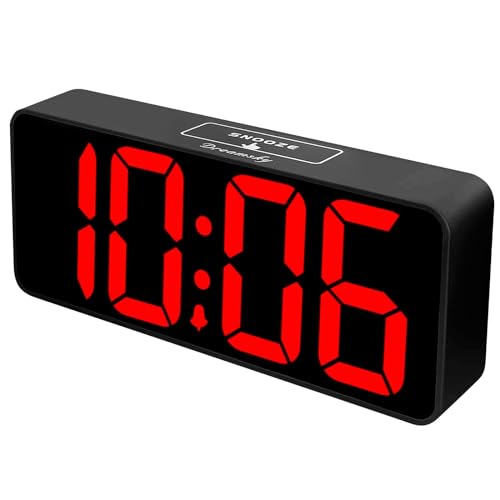
The DreamSky Large Digital Alarm Clock stands out for seniors who need clear, easy-to-read time display and straightforward operation, especially those with vision challenges or sensitivity to cluttered interfaces. I find its 3-inch red LED digits on a black background highly legible from a distance, and the dimmer wheel lets me adjust brightness smoothly. It runs on AC power but keeps time during outages with two AAA batteries. The single alarm has a 9-minute snooze, and volume adjusts between 30–90 decibels. A built-in USB port charges devices, and the 1-year warranty offers peace of mind.
Best For: Seniors and individuals with visual impairments who need a large, clear digital display and simple, intuitive controls.
Pros:
- Extra-large 3-inch red LED digits ensure excellent visibility from a distance, ideal for low-vision users
- Dimmable display with smooth brightness adjustment and battery backup for uninterrupted timekeeping
- Built-in USB charging port and straightforward alarm setup suitable for elderly users and children
Cons:
- Display goes blank and alarm doesn’t function during power outages when running on battery backup only
- Only one alarm available, which may not suit users needing multiple wake-up times
- Red LED display may be too bright for some in dark bedrooms, despite dimming capability
Digital Alarm Clock for Dementia Seniors (Black)

This digital alarm clock stands out as an ideal choice for seniors living with dementia, especially those who rely on clear visual and auditory cues to stay oriented. I appreciate its 7-inch screen with full-text day, date, and month-no confusing abbreviations. The voice announcement, available in nine languages, helps when reading is tough. Multiple alarms support medications or routines, which I find helpful for consistency. Automatic brightness adjusts smoothly overnight, reducing glare without buttons to press. I’ve found the remote and one-touch controls simple, even for those with limited tech experience. It’s straightforward, functional, and built for real daily use.
Best For: Seniors with dementia or visual impairments who need clear, multi-sensory time and date cues to maintain daily routines.
Pros:
- Large 7-inch display shows full-day, date, and month text for easy reading without abbreviations
- Voice time announcement in 9 languages provides audible support for low-vision users
- Automatic brightness adjustment reduces eye strain with smooth day-night transitions
Cons:
- Limited to fixed brightness schedule (dimmers at 7 PM, brightens at 7 AM) with no customization
- No mention of battery backup during power outages
- Remote control functionality may be limited to basic functions, not full setup control
Sharp LED Alarm Clock with Big Red Display
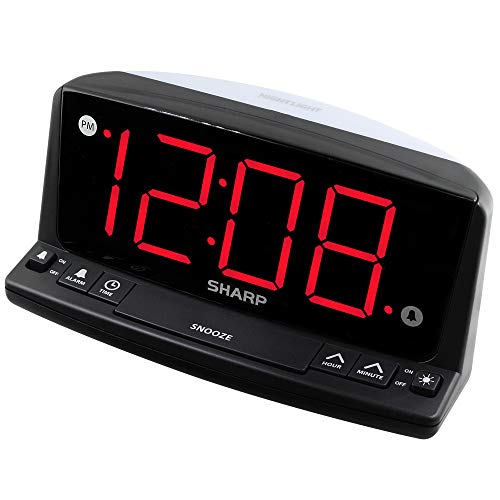
You’ll find the Sharp LED Alarm Clock with Big Red Display especially helpful if you’re a senior who values visibility and simplicity in a timepiece. I rely on its large 1.8-inch red digits-they’re bright, easy to read from across the room, and clear even without glasses. The front controls are intuitive, making setup and adjustments simple. Its built-in night light adds practicality, especially during nighttime bathroom trips. The loud beep alarm wakes me reliably, and the 9-minute snooze is handy. Even during power outages, the 9V backup keeps settings intact, though the screen goes dark-the alarm still works.
Best For: Seniors and anyone seeking a highly visible, easy-to-use alarm clock with reliable alarm and power backup features.
Pros:
- Large, bright 1.8-inch red LED display is easy to read from across the room, even without glasses
- Simple front-panel controls and built-in night light enhance user convenience, especially for seniors and children
- 9V battery backup maintains time and alarm settings during power outages, with a loud alarm and 9-minute snooze function
Cons:
- Screen turns off during battery backup mode, so time isn’t visible during outages
- Beep alarm sound may be too harsh or dated for some users
- Night light brightness may be insufficient for larger rooms or very dark environments
Factors to Consider When Choosing an Alarm Clock for Seniors
You’ll want a clock with a large display and adjustable brightness so it’s easy to read in any lighting without straining your eyes. Look for models with simple buttons and loud alarms, since clear controls and strong sound can make mornings easier, especially if hearing or dexterity is a concern. Don’t overlook power outage backup-it keeps your alarm running during outages, so you won’t miss important timings even if the power fails overnight.
Large Display Visibility
An alarm clock with a display featuring digits at least 2 inches tall makes a meaningful difference in readability, especially if you’re dealing with age-related vision changes. You’ll spot the time clearly from across the room, reducing eye strain and making early-morning checks easier. Look for high-contrast displays-like red or green LED digits against a dark background-since they boost visibility in dim light. A larger screen with a resolution such as 1024x600P delivers sharp, defined numbers, helping if you have mild visual impairments. These features work together to provide clear, instant time reading without squinting. When testing models, prioritize clean layout and bold numerals over extra functions that clutter the display. Many reliable clocks offer trial periods, so you can assess clarity in your own bedroom setting.
Adjustable Brightness Levels
Clear visibility matters, but how bright that display stays throughout the day and night plays an equally important role in your sleep environment. You’ll want adjustable brightness levels-most clocks offer 5 to 10 settings-so you can reduce glare when it’s dark. Some models automatically dim between 7:00 and 9:30 PM, then brighten again by morning, helping regulate eye strain and sleep patterns. Others let you manually adjust brightness from 10% to 100%, giving you full control based on room lighting or sensitivity. Lower settings cut down on light pollution, which is key if you’re sensitive to light or trying to support natural melatonin production. Models with a completely off display option keep the screen dark all night without silencing the alarm. This balance of flexibility and function helps maintain restful sleep while ensuring you still wake on time.
Easy Button Operation
Since operating small or stiff buttons can be frustrating, especially with arthritis or reduced vision, look for clocks that feature large, tactile buttons on the front or top for simple, reliable access. Choose models with high-contrast labels-like white on black-so you can quickly identify functions without straining your eyes. One-touch controls for snooze or alarm off help you avoid complicated steps, especially when you’re still groggy. Buttons that are slightly raised or recessed give you feedback through touch, so you know you’ve pressed them right, even in the dark. A clean layout with few buttons keeps things from feeling overwhelming and supports easier use if you have memory concerns. You’ll want something intuitive, so you can set times and turn off alarms without confusion. Test the buttons if possible, or pick a model with a trial period to make sure the feel and spacing work well for your hands.
Loud Alarm Options
You’ll want an alarm loud enough to wake you reliably, especially if you’re a heavy sleeper or have mild hearing loss, so look for models offering at least 80 decibels, with some reaching up to 110 dB for added assurance. Many clocks let you choose from high-pitched beeps, soothing nature sounds, or radio tunes, so you can pick what works best for your hearing and comfort. If you dislike being jolted awake, go for one with a gradual volume boost-it starts low and increases over 15 to 30 seconds. Most alarms include a 9-minute snooze, giving you a short break without making it too easy to oversleep. Some sounds, like sharp beeps, cut through background noise better, while music may feel gentler. Test different tones to see which gets your attention without causing stress. Look for models with trial periods or warranties so you can try them risk-free.
Power Outage Backup
Even if the power cuts out in the middle of the night, a reliable alarm clock should still get you up on time. Look for models with battery backup, usually 2 AAA or a 9V, to keep things running. These clocks often use memory backup to save your alarm settings and brightness levels, so you won’t need to reset them when power returns. Some run on battery alone during an outage, turning off the display to save energy, but the alarm still works. Even without a lit screen, the clock keeps track and will wake you as planned. Clocks with lithium or alkaline backup can hold settings for hours or even days, depending on battery life. This guarantees dependable performance, especially if you rely on a strict schedule. Check whether the model maintains full function or just core alarm use during outages to match your needs.
Frequently Asked Questions
Can These Clocks Be Mounted on a Wall?
Yes, you can mount these clocks on a wall-many models include built-in keyhole slots or support for standard wall mounts. You’ll want to check the back panel for mounting options before installing. Some units combine wall-mount ability with tilt stands, so you can adjust the angle whether it’s on a nightstand or wall. Always confirm dimensions and weight to guarantee secure placement. Mounting saves space and improves visibility, especially when you place it at eye level near your bed.
Do Any Models Have a Snooze Bar Instead of a Button?
Yes, some models have a snooze bar instead of a button. You’ll find this feature on certain digital clocks designed for easy access. The bar spans the top, letting you tap anywhere to activate snooze. It’s sturdier than small buttons and easier to hit when half-awake. These clocks often include large displays, adjustable volume, and backup power. Look for ones with at least a 30-day trial so you can test responsiveness and comfort.
Are Replacement Batteries Needed for Backup?
yes, you’ll need replacement batteries for backup in most models. they use them to keep time during power outages, so the clock doesn’t lose settings. typically, a 9-volt or aa battery lasts 6–12 months. check if the model has a low-battery indicator, so you’re not caught off guard. some units include the backup battery, but many don’t-factor that into your purchase and maintenance plan for hassle-free use.
Can the Alarms Be Set to Repeat Only on Weekdays?
You can set the alarms to repeat only on weekdays if the clock has a dedicated weekday schedule option. Look for models with programmable weekday settings, usually labeled “Mon–Fri” or “Workweek.” These clocks let you skip weekends automatically. Check the manual to confirm this feature exists. Some clocks include a skip-Sat–Sun mode, while others require manual adjustment. Always verify the function works as expected during a trial period.
Do Any Clocks Have a Battery-Saving Mode?
Yes, some clocks do have a battery-saving mode, and you’ll find it on models with LCD screens and motion-sensor backlighting. These shut off the display after inactivity, preserving power. Clocks like the iLive! ILKB568B use this to extend battery life during outages. While not all senior-friendly clocks include it, checking specs helps you balance visibility, function, and energy use without sacrificing reliability or ease.