Best Alarm Clocks for Elderly That Are Easy to Use and Reliable
You want a clock with a large, high-contrast display-like 7-inch HD screens or bright red LED digits-to see clearly from across the room, even in low light. Models with adjustable or auto-dimming brightness prevent glare at night. Look for simple controls, strong alarms with snooze, and battery backup to keep time during outages. Some include helpful reminders and quiet operation. Choosing one with a trial period lets you test how well it fits your routine. You’ll find options that balance ease, visibility, and reliability.
We are supported by our audience. When you purchase through links on our site, we may earn an affiliate commission, at no extra cost for you. Learn more. Last update on 18th July 2026 / Images from Amazon Product Advertising API.
Notable Insights
- Large, high-contrast displays with bold digits ensure excellent readability for seniors, even in low light.
- Programmable alarms with snooze, multiple ringtones, and repeat options support reliable, personalized wake-up calls.
- Simple controls with large buttons or touchscreens make operation easy for users with limited dexterity.
- Battery backup maintains time and alarm settings during power outages, ensuring consistent performance.
- Visual reminders and clear time/day/date display help seniors manage daily routines independently.
Soobest Dementia Digital Clock for Seniors

Who hasn’t worried about a loved one forgetting the time, missing a medication dose, or confusing night with day? I’ve found the Soobest Dementia Digital Clock helps reduce that stress. Its 7-inch HD screen shows time, date, and day clearly, with four display modes, including analog and color backgrounds. Six daily time periods clarify whether it’s morning or night. I like that it has 20 programmable alarms with simple icons for meds or meals, plus three ringtones and adjustable volume. Auto-brightness works overnight, and the backup battery keeps settings during outages. It’s lightweight, wall-mountable, and runs on a USB cord-no reprogramming needed.
Best For: Seniors, individuals with dementia or memory loss, and those needing visual and auditory reminders to manage daily routines.
Pros:
- Large 7-inch HD screen with multiple display modes enhances readability and reduces confusion about time of day
- 20 programmable alarms with customizable icons and ringtones support medication, meal, and activity reminders
- Backup battery preserves settings during power outages, and auto-brightness adjusts for nighttime comfort
Cons:
- Requires constant power via USB cord, limiting portability
- Plastic build may feel lightweight or less durable for some users
- No remote control included, relying solely on manual button navigation for setup
Large Digital Clock with Alarms for Seniors

This alarm clock suits seniors who need clear, customizable displays and reliable reminders, especially those managing vision challenges or daily routines. I appreciate the 7-inch HD screen with large, easy-to-read text and bright Sun/Moon icons, plus 12 themes that help with visibility and color preferences. It supports 20 alarms and 20 custom reminders for medicine or hydration, reducing confusion. With 10 brightness levels and a one-touch sleep mode, I can adjust it easily. It runs on AC power, has battery backup, and auto-resets after outages. Nine volume settings, 18 ringtones, and a flexible snooze option work well for different sleep needs.
Best For: Seniors and individuals with vision challenges who need a highly readable, customizable digital clock with reliable alarms and reminders.
Pros:
- Large 7-inch HD display with adjustable brightness and 12 customizable themes for enhanced visibility and user preference
- Supports 20 alarms and 20 custom reminders with clear text and icons, ideal for managing medications and daily routines
- Includes AC power with battery backup and automatic time reset after outages, ensuring consistent reliability
Cons:
- Requires AC adapter and does not include AA batteries for backup, adding to initial setup needs
- Lacks built-in Wi-Fi or atomic clock syncing, requiring manual time adjustments despite DST button
- Photo playback feature requires separate SD card or USB drive not included with purchase
Amazon Basics LED Alarm Clock Black

The Amazon Basics LED Alarm Clock in black works well for older adults who need a simple, reliable wake-up signal without complicated controls. I find its green LED display bright but not harsh, easy to read from a few feet away. It runs on AC power and keeps time during outages with a 9V battery backup. The built-in nightlight is soft, helpful for late-night checks. Its oval shape saves space on a nightstand, and the plastic build feels light yet sturdy. The snooze button works consistently, and the alarm tone is clear, not too sharp. With a 6-month warranty and mostly positive reviews, it’s a solid, no-frills choice for dependable mornings.
Best For: Older adults or anyone seeking a straightforward, reliable alarm clock with easy-to-read display and essential features.
Pros:
- Bright green LED display is easy to read from a distance without being too harsh
- Battery backup retains time and alarm settings during power outages
- Compact oval design saves space and includes a useful soft nightlight
Cons:
- 9V battery not included for backup functionality
- Limited customization options for alarm tone or display brightness
- Plastic build, while sturdy, may feel less premium compared to higher-end models
7″ Dementia Clock for Seniors with Reminders

Looking for a clock that truly supports memory and routine for someone with dementia or mild cognitive decline? I’ve found the FLYRUIT P07C3 helps by displaying time, date, day, and time of day clearly on its 7-inch IPS screen. It offers 10 visual reminders for meds, water, or walks, plus six programmable alarms with gentle tones. I can set it to 12- or 24-hour format, adjust brightness, and pick from eight languages. It mounts on a wall or sits on a tabletop, but it must stay plugged in. With an extended warranty and responsive remote, it’s built for daily use, offering steady support without fuss.
Best For: Individuals with dementia, Alzheimer’s, or mild cognitive decline who need clear time display and daily routine reminders.
Pros:
- Large 7-inch IPS display with bold text and wide viewing angles enhances readability for seniors
- 10 customizable visual reminders and 6 programmable alarms support consistent daily routines
- Offers multiple language options, adjustable brightness, and wall/tabletop mounting for personalized use
Cons:
- Must remain plugged in at all times with no battery backup, limiting placement flexibility
- No battery included and relies on original power adapter for operation
- Daylight Saving Time updates are region-based and disabled by default, requiring manual setup
Sharp Digital Alarm Clock with Red LED

I find the Sharp Digital Alarm Clock with Red LED especially helpful if you’re an older adult needing a straightforward, reliable way to track time and wake up on schedule. It has bright red digits that are easy to read at night, even without glasses. The simple keyboard buttons make setting the time and alarm quick. Its loud alarm and 9-minute snooze work well for heavy sleepers. It plugs in but keeps running on two AAA batteries during outages. The compact, lightweight design fits neatly on any nightstand. Backed by Sharp’s warranty, it’s a practical choice for dependable morning alerts.
Best For: Older adults and anyone seeking a simple, reliable alarm clock with easy-to-read red LED display and dependable alarm functionality.
Pros:
- Bright red LED display is highly visible at night, even without glasses
- Simple keyboard-style controls make setting time and alarm intuitive
- Loud alarm with 9-minute snooze and battery backup ensures reliability during power outages
Cons:
- Does not include AAA batteries for backup power
- Plug-in power source limits placement flexibility
- Basic design lacks modern features like radio, dimmer, or USB charging
DreamSky Large Digital Alarm Clock for Seniors
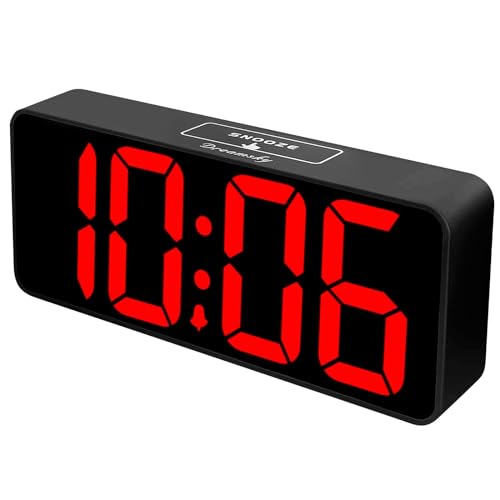
Bright, oversized red numbers light up my room without straining my eyes, making the DreamSky Large Digital Alarm Clock a solid choice for seniors or anyone with declining vision. At 3 inches tall, the red LED digits stand out clearly against the black background, visible from across the room. I can dim the screen fully using the wheel, adjusting brightness from 0–100% to suit nighttime lighting. It runs on a power adapter but keeps time during outages with two AAA batteries-though the alarm won’t sound without main power. The single alarm has a 9-minute snooze and volume control from 30–90 decibels, easy to set with simple buttons. A built-in USB port lets me charge devices, and the 1-year warranty offers peace of mind.
Best For: Seniors and individuals with visual impairments who need a highly visible, easy-to-read digital alarm clock with simple controls and adjustable brightness.
Pros:
- Large 3-inch red LED digits provide excellent visibility from a distance, ideal for low-vision users
- Fully dimmable display (0–100%) allows customization for nighttime comfort
- Built-in USB port enables convenient device charging alongside reliable timekeeping with battery backup
Cons:
- Alarm does not function during power outages even with battery backup
- Display goes blank when running on battery power alone, limiting usability in outages
- Only one alarm with no option for multiple alarm times
5.5″ Silent Analog Alarm Clock for Elderly
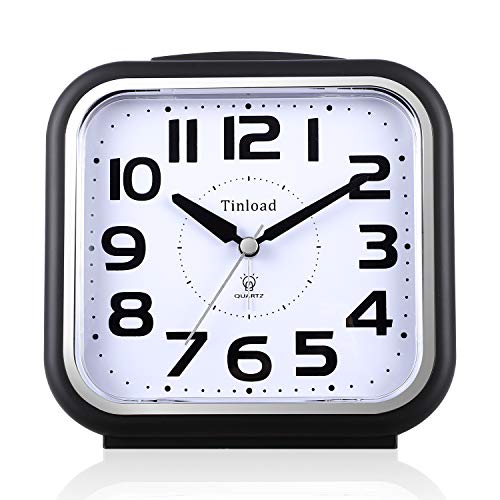
This silent analog alarm clock suits older adults who need a restful night without disruptive ticking sounds. I appreciate its quiet, non-distracting operation-perfect for light sleepers or shared bedrooms. Its 5.5-inch square face has bold black numerals on a white dial, making time-checking easy. Press the button for a quick light, helpful in total darkness. The beep alarm starts soft and builds over four levels, waking you gently. It’ll keep sounding for about an hour or until you turn it off. Powered by one AA battery, it’s simple to set up. The top-mounted snooze and light buttons work smoothly, giving reliable control.
Best For: Older adults and light sleepers who need a quiet, easy-to-read alarm clock with gentle wake-up features.
Pros:
- Completely silent operation with no ticking, ideal for undisturbed sleep
- Large, high-contrast dial with bold numbers and a manual light for excellent visibility
- Gradually escalating alarm ensures a gentle yet effective wake-up experience
Cons:
- Light function must be manually activated and does not turn on automatically in the dark
- Alarm can sound for up to an hour if not manually turned off, which may be excessive
- Requires a separate AA battery, which is not included
Sharp LED Alarm Clock with Large Display
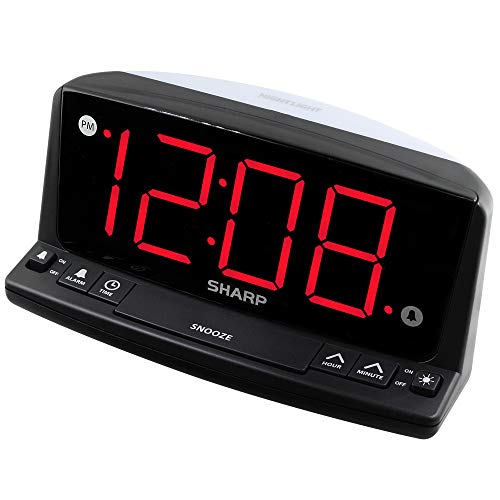
The Sharp LED Alarm Clock with Large Display works best for older adults who need clear visibility and straightforward controls, especially those with trouble reading small text or managing complex devices. I find its 1.8-inch red LED digits bright and easy to read from across the room, even without glasses. Front-panel buttons are intuitive, making setting the time and alarm simple. It includes a loud beep alarm with a 9-minute snooze, ideal for heavy sleepers. A built-in night light adds convenience in dark spaces. During power outages, the 9V battery backup keeps settings preserved, though the screen turns off.
Best For: Older adults and individuals with difficulty reading small text or navigating complex electronics, due to its large, clear display and simple, intuitive controls.
Pros:
- Large 1.8-inch red LED display is highly visible from a distance and readable without glasses, even in low light
- Simple front-panel controls and loud alarm with 9-minute snooze make it user-friendly for seniors and heavy sleepers
- Battery backup preserves time and alarm settings during power outages, with a built-in night light for added convenience
Cons:
- Screen turns off during battery backup mode, so time isn’t visible during power outages despite alarm functionality
- Beep alarm may be harsh or unpleasant for some users who prefer gentler wake-up tones
- Night light, while convenient, is basic and may not provide sufficient illumination for larger rooms
PPLEE Alarm Clock with LED Display & USB Charging
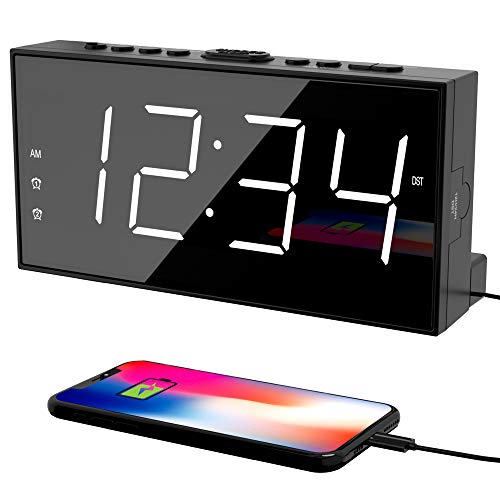
Who needs a reliable wake-up solution that combines visibility, dependability, and convenience will appreciate the PPLEE Alarm Clock with LED Display & USB Charging, especially if aging eyes or disrupted sleep patterns make traditional clocks difficult to use. I find its 7.5-inch LED screen easy to read from across the room, and the adjustable brightness works well for nighttime clarity without glare. Dual alarms help couples with different schedules, and the USB port lets me charge my phone overnight. It runs on AC power with battery backup, so settings stay intact during outages. The alarm volume is strong but not jarring, and the snooze function gives me a few extra minutes without confusion.
Best For: Individuals seeking a highly visible, user-friendly alarm clock with dual alarms and USB charging, especially suitable for seniors, couples with different schedules, and those needing reliable backup during power outages.
Pros:
- Large 7.5-inch LED display with adjustable brightness for clear visibility in any lighting
- Dual independent alarms and strong, customizable alert volume ideal for shared bedrooms
- Built-in USB charging port and battery backup ensure convenience and continuity during power outages
Cons:
- Battery backup requires 2×AAA batteries (not included), adding extra cost
- Screen turns off when running on battery, limiting visibility during outages
- Maximum alarm volume may still be insufficient for extremely deep sleepers
Digital Alarm Clock for Dementia Seniors

What if telling time didn’t require straining to read small numbers or guessing the date from memory? I’ve found this 7-inch digital clock helps by showing the full day, date, and time in large, bold text-no abbreviations. It’s designed for seniors with dementia or poor vision, and the screen automatically brightens at 7 a.m. (250cd/m²) and dims at 7 p.m. (50cd/m²) to reduce eye strain. I can press a button on the remote or device to hear the time spoken in one of nine languages. Multiple alarms support medication schedules or daily routines, while the simple interface means I set it up quickly, even with limited tech experience.
Best For: Seniors with dementia, visual impairments, or memory challenges who need an easy-to-read, audible, and reliable time and date reference.
Pros:
- Large 7-inch display with full-text day, date, and time in bold font enhances visibility for users with poor eyesight
- Voice time announcement in nine languages supports those with low vision or cognitive difficulties
- Automatic brightness adjustment reduces eye strain and ensures comfortable viewing day and night
Cons:
- Fixed dimming and brightening schedule (7 p.m. and 7 a.m.) may not suit all lighting preferences or time zones
- Remote-controlled voice function may be confusing if misplaced or not clearly labeled for users with advanced dementia
- Limited customization options for alarm tones or voice announcement intervals could reduce personalization
Factors to Consider When Choosing an Alarm Clock for Elderly
You’ll want to check the display clarity and size first-larger, high-contrast numbers make it easier to read at a glance, especially in low light. Look for models with simple controls and adjustable brightness so you can set alarms without hassle and still see the time clearly at night. Features like customizable alarms, easy power backup, and straightforward setup help support consistent routines without overwhelming complexity.
Display Clarity And Size
A clear and easy-to-read display is essential when choosing an alarm clock for elderly users, especially for those with declining vision. You’ll want a screen of at least 7 inches with 1024×600 resolution for sharp, legible images from a distance. Look for models with digits 2 inches tall or larger-they make time recognition simple, even without glasses. High-contrast colors like red or green LEDs on black boost visibility in both daylight and darkness. Choose clocks with adjustable brightness, offering 5 to 10 levels so you can tailor light output for day or night comfort. Auto-dimming features help, too, lowering brightness around 7:00 PM to reduce eye strain and support better sleep. These display traits improve usability and promote consistent sleep routines by reducing glare and visual stress.
Ease Of Operation
Clear displays help older adults read the time with ease, but just as important is how easily they can interact with the clock every day. Look for large, responsive buttons or simple touchscreens that don’t require fine motor skills. Models with intuitive menus and clear labels make setup and use less confusing. If mobility or vision is a concern, choose clocks with remote controls or voice activation. One-touch functions let you set alarms, check time, or adjust settings quickly, without scrolling through layers. Immediate feedback-like a beep or flash-tells you the command registered. Clocks designed this way reduce frustration and work better during mornings or nighttime checks. Some offer trial periods, so you can test responsiveness in real use. Prioritize straightforward operation, since consistent, stress-free interaction supports better sleep routines and independence.
Brightness And Visibility
Look for a display with digits at least 1.8 inches tall and high-contrast colors like red or green LED against a dark background, so you can see the time clearly from across the room or in dim light. Choose a clock with adjustable brightness-ideally five levels or auto-dimming-to keep the screen visible without glare at night. Brightness between 50 and 250 cd/m² adapts well to changing light, helping your eyes stay comfortable. A full-text display that spells out the day, date, and time without abbreviations supports better understanding, especially if memory or focus is a concern. Make sure the screen has a wide viewing angle-160 degrees or more-so you can read it easily from bed or a chair. These features work together to reduce strain and confusion, supporting consistent sleep routines by making time easy to read anytime.
Alarm Customization Options
How do you make sure important moments aren’t missed? You customize alarms to match daily needs. Choose models with up to 20 programmable alarms so you can schedule alerts for medications, meals, or walks. Pick clocks that let you set repeat options-daily, weekdays, weekends, or specific dates-so your routine stays on track. Adjust snooze intervals from 3 to 9 minutes to wake up comfortably. Use multiple ringtones and volume settings (5 to 10 levels) to find a sound that works with your hearing. Some clocks even show text reminders or icons for drinking water or moving around, reducing confusion. These features help you stay independent and maintain healthy habits. Customization means the alarm adapts to your life, not the other way around. It supports consistency, which matters for sleep quality and daily focus.
Power Backup Feature
Even when the lights go out, your alarm clock can keep working if it has a proper power backup feature. You’ll want a model that uses a 9V, AAA, or AA battery to preserve time and alarm settings during outages. Some clocks automatically restore the correct time and date once power returns, thanks to internal battery backups. Others may turn off the display temporarily but still remember your alarm, so it’ll sound when needed. Backup duration varies-some last up to 8 hours on battery alone. Without any backup, AC-powered clocks lose all settings during an outage, forcing you to reset them manually. Look for models that clearly specify memory backup support. This small feature means less frustration and more reliable waking, especially important if you rely on a strict schedule or manage sleep disruptions. It’s a practical detail that adds real daily peace of mind.
Frequently Asked Questions
Can These Clocks Be Used in Loud Environments?
Yes, you can use these clocks in loud environments because many have loud alarms that go up to 90 decibels or more. Some include flashing lights or bed shakers for backup. Look for models with adjustable volume and dual alarms so you don’t miss waking up. Test them at home first-most offer 30-day returns or warranties, letting you check performance where you sleep.
Do Any Models Have Backup Battery Power?
Yes, some models do have backup battery power, so you won’t lose time during outages. You’ll find this in clocks with dual-power options-plugged in, they run on AC, but switch to battery if the power fails. Look for ones using AA or AAA batteries as backup; they’re reliable and easy to replace. Check product specs for “battery backup” or “power failure protection” to guarantee you’re getting that feature.
Are the Clocks Suitable for Visually Impaired Users?
Yes, some models are suitable for visually impaired users. You’ll find clocks with large, high-contrast displays, audible time announcements, and tactile buttons for easy navigation. Many use bright LED numbers and voice output, helping you confirm settings without straining. Look for ones with talking alarms or vibration features. Check if they offer trial periods, so you can test usability. Backup battery power is common, preserving settings during outages.
Is Voice Activation Available on These Models?
You’ll find voice activation on select models, letting you set alarms or check time hands-free. These clocks use built-in microphones and respond to simple commands, which helps if mobility or vision is limited. Not all models have this feature, so check specs carefully. Units with voice control often pair with smart assistants like Alexa. Test during the trial period to guarantee reliable response. Look for models offering warranties, so you can return them if performance doesn’t meet your needs.
Can I Adjust Alarm Volume on All Clocks?
Yes, you can adjust the alarm volume on most clocks, but the range and ease vary. Some models offer broad volume control, ideal if hearing sensitivity differs. Others have limited increments, which might not suit everyone. You’ll want to test the sound level in your bedroom environment. Many brands include trial periods, so you can return them if the volume settings don’t meet your needs. Check warranty terms before finalizing your choice.